


Guides · Start here
Your worlds
Besides the big shared world online, you can keep up to 5 worlds of your own. Each one is yours to shape: sky islands, a single magic block, flat land for building, or the wild lands with every biome. This page shows you how to make a world, set its rules, bring friends in and keep it safe.
Your world slots
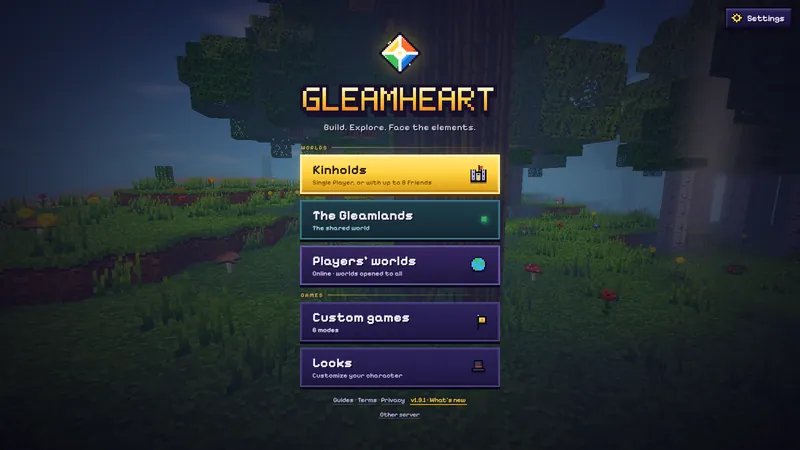
Your worlds live in Kinholds on the title menu. It has 5 slots, and each world fills one. Single-player worlds are saved in your browser, on this device. Continue, on the title menu, jumps straight back into the world you played last. Beside each world are small buttons:
- Rename this world (the pencil): give it a name you will remember. A world with no name shows as World and its slot's number.
- Save this world to a file (the down arrow): download a copy to keep somewhere safe or to move to another computer.
- Load a world file, under the list, puts a saved file back into a free slot. If every slot is full, delete a world first.
- Bring online (the up arrow): sends a copy of the world to our server as a private world of yours, so friends can play in it while you are away.
- The bin button deletes a world. Save it to a file first if you might want it back.
Making a world
- Open Kinholds and press New world. (The very first time you play, the big Play button does all of this for you with a Medium world.)
- Pick the kind of world you want. Each card has a picture and a line about it.
- Choose your path: how hard the world fights back.
- Open World rules if you want to change how the world works. You can skip this and change them later.
- First world? Pick the path New to Gleamheart: a Medium world where Rivet, a small Firstfolk scout, comes along and shows you the basics.
- Press Create world and you are in. A new single-player world opens with a short story scene.
Kinds of world
There are 7 kinds of world. Every one has the same crafting, creatures and story, so pick the one that sounds the most fun.
| World | What it is like |
|---|---|
| Gleamland Wilds | Every biome, cave and ruin, the way the Gleamlands have it. The best place to start. |
| SMP | Gleamland Wilds on our server, for up to 30 players, kept for good. You can only make it as a private world on our server. |
| Sky Islands | Grassy islands floating over an open sky, with ore under them. Everyone can glide and keeps their things on death, unless you change the rules. Don't look down. |
| One Block | One block in the void. Break it and it comes back as something new, climbing through The Meadow, The Old Wood, The Stone, The Frost, The Deep, The Ember, The Brinefold, The Firstfolk Wastes, and The Gleamheart. Now and then it is a chest, or something climbs out of it. Everything you build grows from there. |
| Flat | Flat grass over dirt and stone, with the odd tree. Plenty of room to build. |
| One Land | One land from end to end. You pick it on the card: Forest, Pinewood, Snow, Desert, and Plains. |
| Archipelago | A sea of named islands. Bring a boat. |
In Sky Islands and One Block, falling off the bottom means a death in the void. Watch your step.
In Sky Islands and the Archipelago, an isle counts as found the moment someone sets foot on it, and the first foot finds it for everyone. The world panel shows its name, how many isles the world has found and how many you found. Tap the panel, or type /world, to see the latest finds and who made them.
Difficulty: choose your path
Your path sets how hungry you get and how hard creatures hit. Pick the one that fits how you like to play: there is no wrong answer, only more or fewer close calls.
| Path | What it means |
|---|---|
| Easy: the Wanderer | No hunger, and food heals you straight away. Monsters hit for half and there are fewer of them. Good for building and exploring in peace. |
| Medium: the Adventurer | You get hungry and need to eat to heal. Monsters hit as hard as they should. Starving takes you down to half a shard of life, never further. |
| Hard: the Unyielding | Hunger as on Medium, but starving can kill you. Monsters hit harder, there are more of them, and bosses attack more often. |
World rules
World rules change how a world works, on top of your path. Each starts at Normal, or at the world's own setting (Sky Islands and One Block keep your things when you die). Want an endless summer afternoon, or a world with no monsters at all? This is where you get it.
| Rule | Choices | What it changes |
|---|---|---|
| Creatures | Fewer, Normal, More, and Peaceful | How many creatures come out: 50% as many, or 75% more. Peaceful leaves only animals, and Keepers come only when you call them. |
| Creature damage | Low, Normal, and High | How hard creatures hit: 50% or 150% of their usual damage. |
| Day length | Short, Normal, Long, and Frozen | How long a day lasts: 5, 10 or 20 minutes. Frozen stops the sun where it is, so set the hour first with /time. |
| On death | Drop items, Drop some, and Keep items | What you drop when you die. With Drop some, your satchel, off hand and armor stay with you and only the bag drops. |
| Gravity | Low, Normal, and High | Low makes jumps float and falls land softly. High does the opposite. |
| Jump | Normal, High, and Mighty | How high you jump: 2 or 4 times as high. Landing from your own jump never hurts. |
| Glide | With wings and Everyone | With Everyone, anyone can hold jump in the air to glide, no wings needed. |
| PvP | Off and On | Off means no player can hurt another. Creatures still bite. |
| Blasts | Off and On | Off means a Blastcharge only knocks things back and breaks no blocks. |
| Fires | Burn on and Need fuel | With Need fuel, campfires and Homefires burn wood or coal and go cold when they run dry. A fire in a claim or at the Hold never goes cold. |
Alone or with friends
A world in your browser is yours alone. It runs on your device and needs no internet once the game has loaded.
Want company? Inside your world, open the pause menu, press Friends, then Invite to this world. Send the link or show the QR code, and up to 8 friends can join you from their own browsers. The world closes for them when you leave, and their characters wait in your world for next time.
For a world your friends can visit while you are offline, make a private world on our server: in Kinholds, open On our server and create one there. A guest can keep 1 world on our server, and a signed-in player 3. Up to 10 players can be in one at once, or 30 in an SMP world.
SMP worlds, and the worlds of players who sign in, are kept for good. A guest's other world is freed after 7 days with nobody in it, and its owner can still download it for 90 days after that. Playing together has the whole story: codes, invites and lists.
Saving
You never have to press save. A single-player world saves itself in your browser every few seconds, and a small Saved mark flashes at the top right when it does. The pause menu says when it last saved. Worlds on our server save on our server.
Sign in, and the game also keeps a copy of each single-player world on your account, for up to 6 worlds. It updates in the background while you play and never makes you wait. When you delete a world on one device, the game asks whether to delete the copy on your account too.
One warning: clearing your browser's site data deletes the worlds saved in it. If a world matters to you, save it to a file now and then, or sign in so your account keeps a copy.
Leaving a world
To stop playing, open the pause menu (Esc, or the menu button on a phone) and press Leave world. On a computer, L does it from the pause menu too. What happens next depends on the world:
- Your own world: it saves first, then you are back at the title menu. Nothing is lost.
- Your world, with friends in it: your friends see that the world has closed. Their characters are saved in your world for next time.
- A world on our server: the world keeps going for anyone still inside, and your character waits there for you.
- To come back, press Continue, or pick the world in Kinholds.
Changing a world later
Changed your mind about the rules? Press the book button beside a world in Kinholds, or type /rules inside the world. /rules alone lists them, and /rules days long sets one (the others are creatures, damage, death, gravity, jump, glide, pvp, blasts and fires). Only a world's owner can change its rules, and /world tells anyone which world they are in and how it is set. Guests see any rules that differ from Normal when they arrive. The Gleamlands keep one set of rules for everyone.
In a private world on our server, its keeper can also set the time with /time and the weather with /weather. In One Block, its keeper can send the block back to any stage already reached with /phase.
On our server, any kind of world can be a Creative world, chosen when you make it. Its keeper builds freely with the Builder's Lens, and so do the players the keeper adds with /builders add. Nothing earned in a Creative world counts anywhere else (no achievements, Torn Pages, Path rewards or earned looks), and a Creative world stays Creative for good.
Your first day in a new world: Your first day. Every command: Commands. Keys and settings: Controls and settings.
Your next step: Crafting. All sections: the guides.